|
少量代码设计一个登录界面 - .NET CORE(C#) WPF开发 阅读导航 1. 本文背景继续 MaterialDesignThemes 开源控件库学习,本文简单使用输入控件的水印附加属性:
materialDesign:HintAssist.Hint。 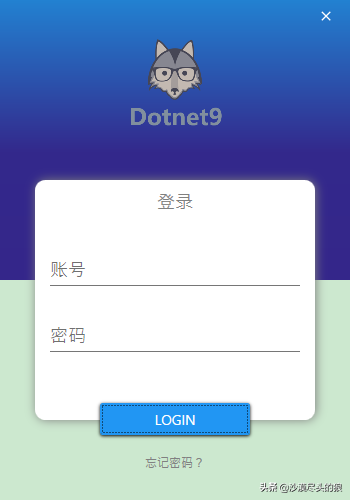
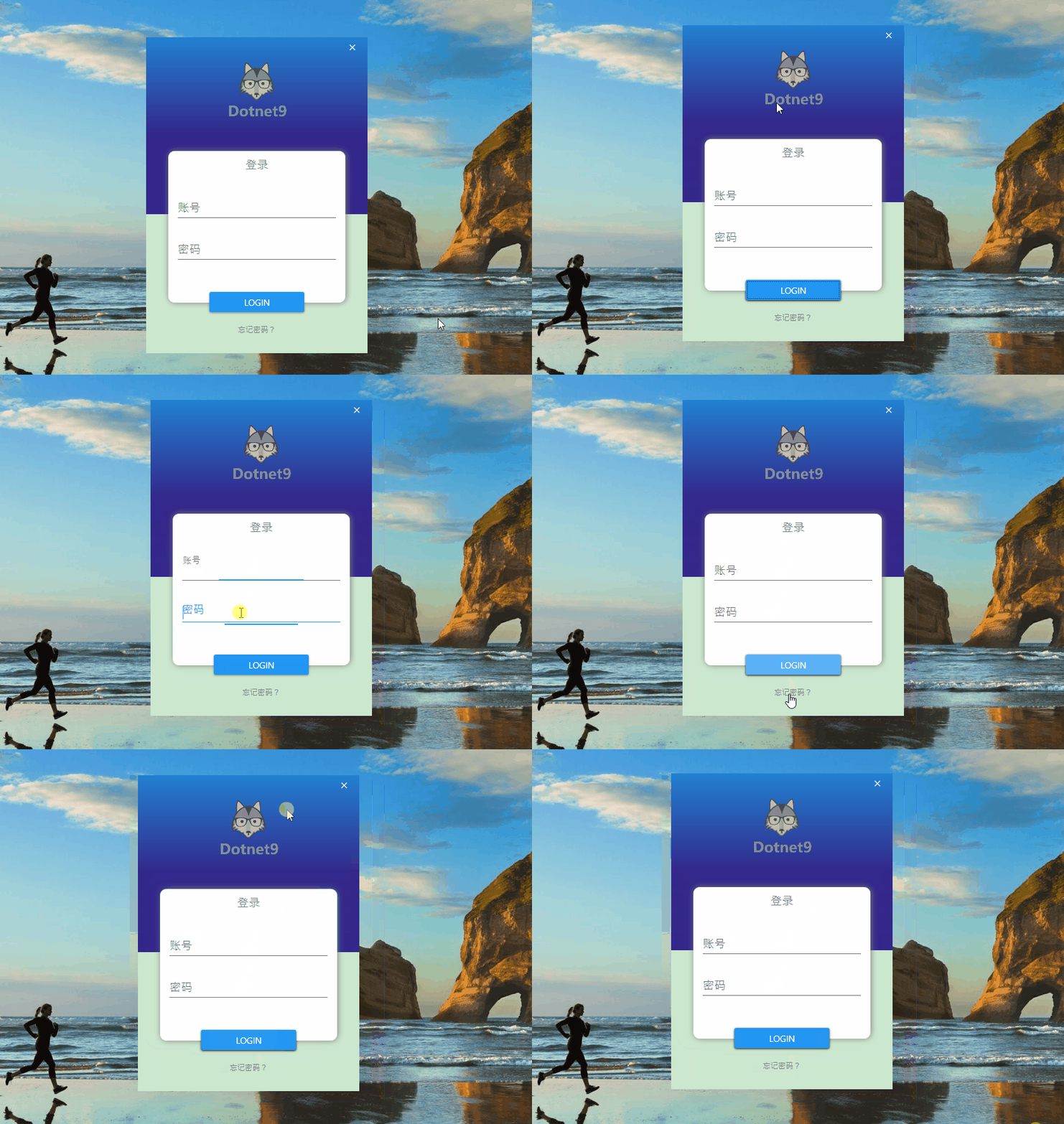
2. 代码实现使用 .NET CORE 3.1 创建名为 “Login” 的WPF模板项目,添加1个Nuget库:
MaterialDesignThemes.3.1.0-ci981。 解决方案主要文件目录组织结构: - LoginApp.xamlMainWindow.xamlMainWindow.xaml.cs
2.1 App.xaml文件引入样式文件【App.xaml】,在 StartupUri 中设置启动的视图【MainWindow.xaml】,并在【Application.Resources】节点增加 MaterialDesignThemes库的样式文件: <Application x:Class="Login.App" xmlns="http://schemas.microsoft.com/winfx/2006/xaml/presentation" xmlns:x="http://schemas.microsoft.com/winfx/2006/xaml" xmlns:local="clr-namespace ogin" StartupUri="MainWindow.xaml"> <Application.Resources> <ResourceDictionary> <ResourceDictionary.MergedDictionaries> <ResourceDictionary Source="pack://application:,,,/MaterialDesignThemes.Wpf;component/Themes/MaterialDesignTheme.Light.xaml" /> <ResourceDictionary Source="pack://application:,,,/MaterialDesignThemes.Wpf;component/Themes/MaterialDesignTheme.Defaults.xaml" /> <ResourceDictionary Source="pack://application:,,,/MaterialDesignColors;component/Themes/Recommended/Primary/MaterialDesignColor.Blue.xaml" /> <ResourceDictionary Source="pack://application:,,,/MaterialDesignColors;component/Themes/Recommended/Accent/MaterialDesignColor.Indigo.xaml" /> </ResourceDictionary.MergedDictionaries> </ResourceDictionary> </Application.Resources></Application>2.2 MainWindow.xaml 登录窗体 ogin" StartupUri="MainWindow.xaml"> <Application.Resources> <ResourceDictionary> <ResourceDictionary.MergedDictionaries> <ResourceDictionary Source="pack://application:,,,/MaterialDesignThemes.Wpf;component/Themes/MaterialDesignTheme.Light.xaml" /> <ResourceDictionary Source="pack://application:,,,/MaterialDesignThemes.Wpf;component/Themes/MaterialDesignTheme.Defaults.xaml" /> <ResourceDictionary Source="pack://application:,,,/MaterialDesignColors;component/Themes/Recommended/Primary/MaterialDesignColor.Blue.xaml" /> <ResourceDictionary Source="pack://application:,,,/MaterialDesignColors;component/Themes/Recommended/Accent/MaterialDesignColor.Indigo.xaml" /> </ResourceDictionary.MergedDictionaries> </ResourceDictionary> </Application.Resources></Application>2.2 MainWindow.xaml 登录窗体文件【MainWindow.xaml】,设计登录主界面,代码量很小,源码如下: <Window x:Class="Login.MainWindow" xmlns="http://schemas.microsoft.com/winfx/2006/xaml/presentation" xmlns:materialDesign="http://materialdesigninxaml.net/winfx/xaml/themes" xmlns:d="http://schemas.microsoft.com/expression/blend/2008" xmlns:x="http://schemas.microsoft.com/winfx/2006/xaml" xmlns:mc="http://schemas.openxmlformats.org/markup-compatibility/2006" mc:Ignorable="d" Title="登录" Height="500" Width="350" ResizeMode="NoResize" WindowStartupLocation="CenterScreen" WindowStyle="None" MouseLeftButtonDown="MoveWindow_MouseLeftButtonDown" FontFamily="Segoe UI Emoji"> <Grid> <Rectangle Height="280" VerticalAlignment="Top"> <Rectangle.Fill> <LinearGradientBrush EndPoint="0.5,1" StartPoint="0.5,0"> <GradientStop Color="#FF2281D1"/> <GradientStop Color="#FF34268A" Offset="1"/> <GradientStop Color="#FF33288B" Offset="0.546"/> </LinearGradientBrush> </Rectangle.Fill> </Rectangle> <Rectangle Width="280" Height="240" VerticalAlignment="Bottom" Margin="0,80" RadiusY="10" RadiusX="10" Fill="White"> <Rectangle.Effect> <DropShadowEffect BlurRadius="15" Direction="0" RenderingBias="Quality" ShadowDepth="1" Color="#FFBBBBBB"/> </Rectangle.Effect> </Rectangle> <Grid VerticalAlignment="Bottom" Margin="35,80" Height="240"> <Label Content="登录" HorizontalAlignment="Center" VerticalAlignment="Top" Margin="5" Foreground="Gray" FontSize="18"/> <StackPanel VerticalAlignment="Center" Margin="15"> <TextBox Margin="0,10" materialDesign:HintAssist.Hint="账号" Style="{StaticResource MaterialDesignFloatingHintTextBox}" FontFamily="Champagne & Limousines" FontSize="18"/> < asswordBox Margin="0,10" materialDesign:HintAssist.Hint="密码" Style="{StaticResource MaterialDesignFloatingHintPasswordBox}" FontFamily="Champagne & Limousines" FontSize="18"/> </StackPanel> </Grid> <Button Width="150" HorizontalAlignment="Center" VerticalAlignment="Bottom" Margin="0,65" Content="LOGIN"/> <TextBlock Text="忘记密码?" HorizontalAlignment="Center" VerticalAlignment="Bottom" Margin="30" Foreground="Gray" Cursor="Hand"/> <Button HorizontalAlignment="Right" VerticalAlignment="Top" Background="{x:Null}" BorderBrush="{x:Null}" Click="Close_Click"> <materialDesign asswordBox Margin="0,10" materialDesign:HintAssist.Hint="密码" Style="{StaticResource MaterialDesignFloatingHintPasswordBox}" FontFamily="Champagne & Limousines" FontSize="18"/> </StackPanel> </Grid> <Button Width="150" HorizontalAlignment="Center" VerticalAlignment="Bottom" Margin="0,65" Content="LOGIN"/> <TextBlock Text="忘记密码?" HorizontalAlignment="Center" VerticalAlignment="Bottom" Margin="30" Foreground="Gray" Cursor="Hand"/> <Button HorizontalAlignment="Right" VerticalAlignment="Top" Background="{x:Null}" BorderBrush="{x:Null}" Click="Close_Click"> <materialDesign ackIcon Kind="Close"/> </Button> <Image Source="https://img.dotnet9.com/logo-foot.png" Width="100" Height="100" VerticalAlignment="Top" Margin="30"/> </Grid></Window> ackIcon Kind="Close"/> </Button> <Image Source="https://img.dotnet9.com/logo-foot.png" Width="100" Height="100" VerticalAlignment="Top" Margin="30"/> </Grid></Window>下面是后台代码:文件【MainWindow.xaml.cs】,关闭窗体、窗体移动等事件处理。 using System.Windows;using System.Windows.Input;namespace Login{ /// <summary> /// Interaction logic for MainWindow.xaml /// </summary> public partial class MainWindow : Window { public MainWindow() { InitializeComponent(); } private void MoveWindow_MouseLeftButtonDown(object sender, MouseButtonEventArgs e) { DragMove(); } private void Close_Click(object sender, RoutedEventArgs e) { this.Close(); } }}3.本文参考- 视频一:C# WPF Material Design UI: Login Window,配套源码:Login2。
- C# WPF开源控件库《MaterialDesignInXAML》
4.源码演示代码已全部奉上,为了方便演示,代码中的图片使用本站外链,代码可直接拷贝并按代码结构组织编译即可运行。
| 
 /1
/1 
 |手机版|免责声明|本站介绍|工控课堂
( 沪ICP备20008691号-1 )
|手机版|免责声明|本站介绍|工控课堂
( 沪ICP备20008691号-1 )

 发表于 2021-3-13 19:33:24
 提升卡
提升卡 置顶卡
置顶卡 照妖镜
照妖镜 发表于 2021-3-16 02:41:57
