前言在上一篇文章《Pytest fixture及conftest详解》中,我们介绍了fixture的一些关键特性、用法、作用域、参数等,本篇文章将结合fixture及conftest实现一键动态切换自动化测试环境。在开始前,我们可以先思考几个问题:动态切换测试环境的目的是什么(能够解决什么问题)?该如何实现(实现方案)?具体步骤是什么(实现过程)? 一、动态切换测试环境的目的是什么?动态切换测试环境的目的是什么,或者说它能解决什么样的问题:
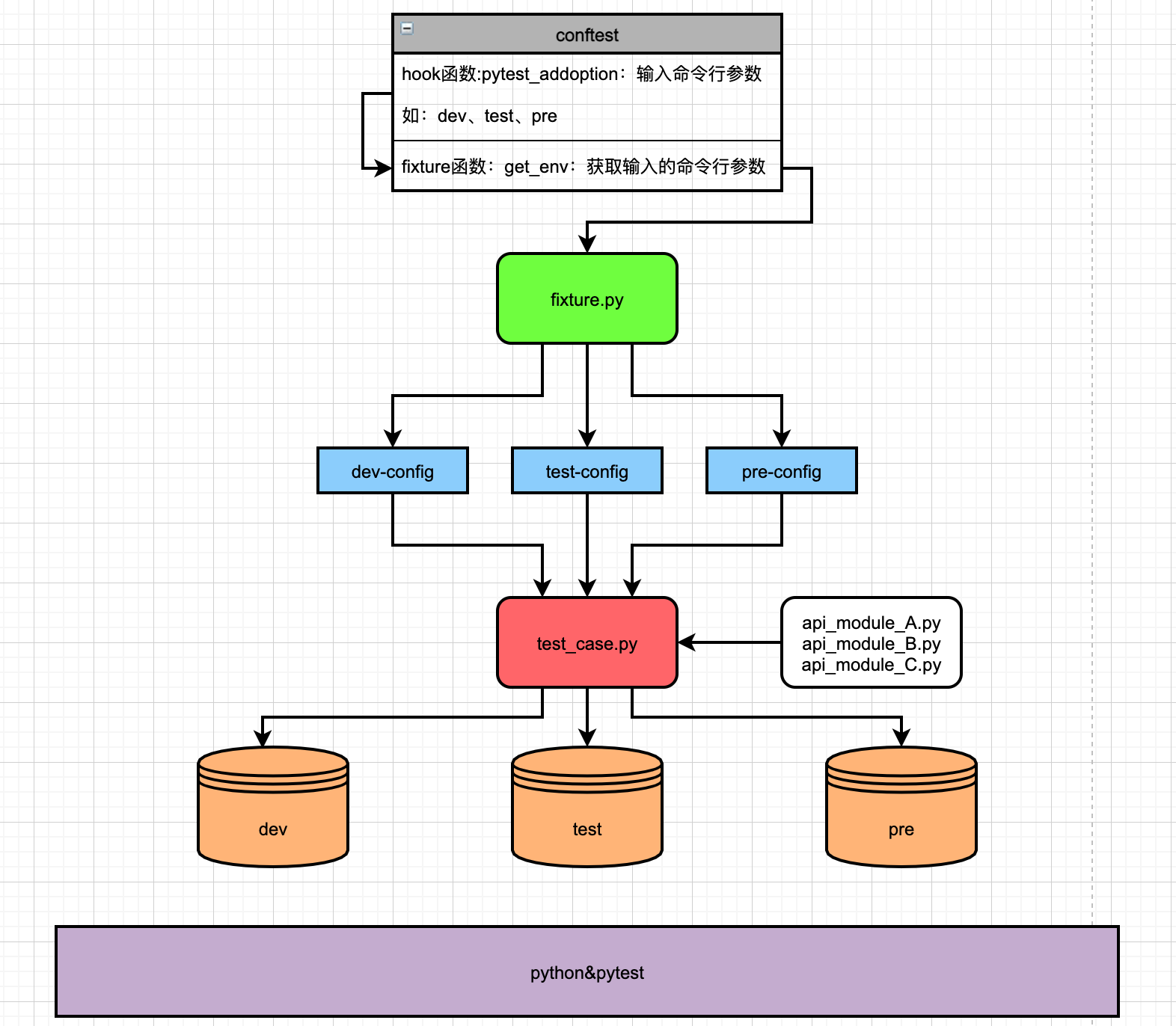
其实以上总结起来就是:一套测试脚本,能根据环境进行自动化的配置,省去手动配置参数的步骤,可以实现在多环境中运行,从而快速验证各个接口及相关服务在不同环境中的表现。 二、动态切换测试环境如何实现?1.实现方案我们希望:可以有个开关,自由控制执行脚本的运行环境,而不是需要我们手动修改,比如:选择dev时,自动读取的是开发环境的配置及测试数据:url、数据库配置、账号密码、测试数据;当切换到test时,自动读取的是测试环境的配置及测试数据。 大致实现原理如下所示:
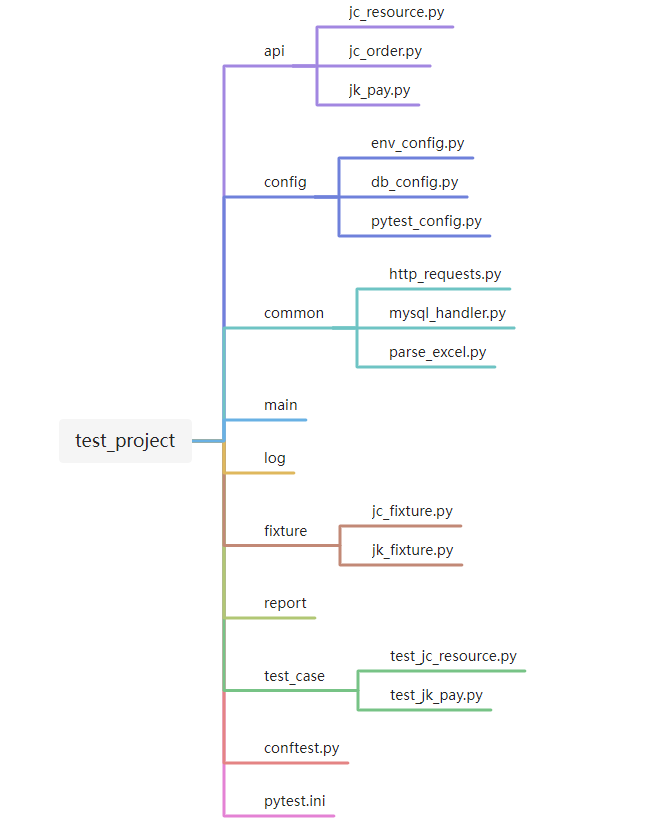
2.目录结构&框架设计小技巧1)目录结构项目结构大致如下,至于目录结构和文件命名,只能说萝卜青菜各有所爱。比如有人喜欢把存放公共方法的common目录命名为utils,存放各个api模块的api目录命名为src......
2)自动化测试框架设计小技巧
三、实现过程上述的方案单从文字层面可能有些难以理解,下面我们结合具体的代码案例来详细讲述一下实现过程。 1.实现自定义命令行参数工具在conftest.py中定义一个hook函数,实现自定义命令行工具,名为pytest_addoption(固定写法),用来在命令行中传入不同的环境参数;  def pytest_addoption(parser): """ 添加命令行参数 parser.addoption为固定写法 default 设置一个默认值,此处设置默认值为test choices 参数范围,传入其他值无效 help 帮助信息 """ parser.addoption( "--env", default="test", choices=["dev", "test", "pre"], help="enviroment parameter" ) 2.定义获取命令行参数的fixture函数在conftest.py中定义get_env的fixture函数,用来获取用户在命令行输入的参数值,传递给fixture.py中的各个fixture函数。pytestconfig是request.config的快捷方式,所以request.config也可以写成pytestconfig。
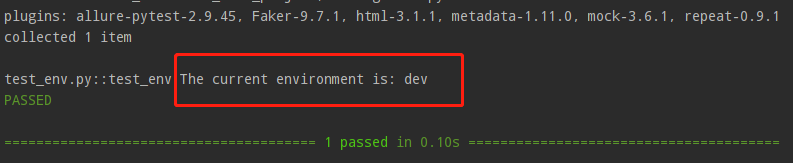
来测试一下命令行能否输入参数以及fixture函数get_env能否获取到。我们可以简单定义一个测试用例: def test_env(get_env): print(f"The current environment is: {get_env}") 然后通过命令行执行此测试用例: pytest -s -v --env dev test_env.py::test_env 执行结果如下:
3.定义环境解析策略例如当前项目为jc项目,则可以在fixture目录下定义一个jc_fixture.py的文件,用于专门存放此项目相关的fixture函数。fixture.py中的各个fixture函数根据get_env提供的环境参数值,解析测试环境对应的数据文件内容:URL(get_url)、账号(get_user)、数据库配置(get_db),同时传递给api类(api_module_A...B...C)进行实例化,登录方法(login)、数据库连接方法(use_db)等,进行初始化,这部分fixture函数再传递给测试用例,用于用例前后置操作(相当于setup/teardown); import pytest from config.config import URLConf, PasswordConf, UsernameConf, ProductIDConf from api.jc_common import JCCommon from api.jc_resource import JCResource from config.db_config import DBConfig from common.mysql_handler import MySQL @pytest.fixture(scope="session") def get_url(get_env): """解析URL""" global url if get_env == "test": print("当前环境为测试环境") url = URLConf.RS_TEST_URL.value elif get_env == "dev": print("当前环境为开发环境") url = URLConf.RS_DEV_URL.value elif get_env == "pre": print("当前环境为预发布环境") url = URLConf.RS_PRE_URL.value return url @pytest.fixture(scope="session") def get_user(get_env): """解析登录用户""" global username_admin, username_boss # 若get_env获取到的是test,则读取配置文件中测试环境的用户名 if get_env == "test": username_admin = UsernameConf.RS_TEST_ADMIN.value username_boss = UsernameConf.RS_TEST_BOSS.value # 若get_env获取到的是dev,则读取配置文件中开发环境的用户名 elif get_env == "dev": username_admin = UsernameConf.RS_TEST_ADMIN.value username_boss = UsernameConf.RS_TEST_BOSS.value # 若get_env获取到的是pre,则读取配置文件中预发布环境的用户名 elif get_env == "pre": username_admin = UsernameConf.RS_TEST_ADMIN.value username_boss = UsernameConf.RS_TEST_BOSS.value @pytest.fixture(scope="session") def get_db(get_env): """解析数据库配置""" global db_host, db_pwd, db_ssh_host, db_ssh_pwd, db_name if get_env == "test": db_host = DBConfig.db_test.get('host') db_pwd = DBConfig.db_test.get('pwd') db_ssh_host = DBConfig.db_test.get('ssh_host') db_ssh_pwd = DBConfig.db_test.get('ssh_pwd') db_name = DBConfig.db_test.get('dbname_jc') elif get_env == "dev": db_host = DBConfig.db_test.get('host') db_pwd = DBConfig.db_test.get('pwd') db_ssh_host = DBConfig.db_test.get('ssh_host') db_ssh_pwd = DBConfig.db_test.get('ssh_pwd') db_name = DBConfig.db_test.get('dbname_jc') elif get_env == "pre": db_host = DBConfig.db_test.get('host') db_pwd = DBConfig.db_test.get('pwd') db_ssh_host = DBConfig.db_test.get('ssh_host') db_ssh_pwd = DBConfig.db_test.get('ssh_pwd') db_name = DBConfig.db_test.get('dbname_jc') @pytest.fixture(scope="session") def jc_common(get_env, get_url): """传入解析到的URL、实例化jc项目公共接口类""" product_id = ProductIDConf.JC_PRODUCT_ID.value jc_common = JCCommon(product_id=product_id, url=get_url)  最新评论热门文章
关闭
站长推荐
|

 /1
/1 
