TableDelegate 自定义代理组件的主要作用是对原有表格进行调整,例如默认情况下Table中的缺省代理就是一个编辑框,我们只能够在编辑框内输入数据,而有时我们想选择数据而不是输入,此时就需要重写编辑框实现选择的效果,代理组件常用于个性化定制Table表格中的字段类型。 代理类的作用是用来实现重写的,例如我们的TableView中默认是可编辑的,这个可编辑的组件是QT默认为我们重写了QLineEdit组件,也可理解为将组件嵌入到了表格中,实现了对表格的编辑功能。 在自定义代理中QAbstractItemDelegate是所有代理类的抽象基类,我们继承任何组件时都必须要包括如下4个函数: - CreateEditor() 用于创建编辑模型数据的组件,例如(QSpinBox组件)
- SetEditorData() 从数据模型获取数据,以供Widget组件进行编辑
- SetModelData() 将Widget组件上的数据更新到数据模型
- UpdateEditorGeometry() 给Widget组件设置一个合适的大小
此处我们分别重写三个代理接口,其中两个ComBox组件用于选择婚否,SpinBox组件用于调节数值范围,先来定义三个重写部件。 先来实现一个代理,代理到Spin组件上,首先需要在项目上右键 - 选择addnew -> C++Class 输入自定义类名称QWintSpinDelegate,然后基类继承QStyledItemDelegate/QMainWindow,然后下一步结束向导。
重写接口spindelegate.cpp代码如下. #include "spindelegate.h"
#include <QSpinBox>
QWIntSpinDelegate::QWIntSpinDelegate(QObject *parent):QStyledItemDelegate(parent)
{
}
QWidget *QWIntSpinDelegate::createEditor(QWidget *parent,const QStyleOptionViewItem &option, const QModelIndex &index) const
{
Q_UNUSED(option);
Q_UNUSED(index);
QSpinBox *editor = new QSpinBox(parent);
editor->setFrame(false);
editor->setMinimum(0);
editor->setMaximum(10000);
return editor;
}
void QWIntSpinDelegate::setEditorData(QWidget *editor,const QModelIndex &index) const
{
int value = index.model()->data(index, Qt::EditRole).toInt();
QSpinBox *spinBox = static_cast<QSpinBox*>(editor);
spinBox->setValue(value);
}
void QWIntSpinDelegate::setModelData(QWidget *editor, QAbstractItemModel *model, const QModelIndex &index) const
{
QSpinBox *spinBox = static_cast<QSpinBox*>(editor);
spinBox->interpretText();
int value = spinBox->value();
model->setData(index, value, Qt::EditRole);
}
void QWIntSpinDelegate::updateEditorGeometry(QWidget *editor, const QStyleOptionViewItem &option, const QModelIndex &index) const
{
Q_UNUSED(index);
editor->setGeometry(option.rect);
}
折叠
重写接口floatspindelegate.cpp代码如下. #include "floatspindelegate.h"
#include <QDoubleSpinBox>
QWFloatSpinDelegate::QWFloatSpinDelegate(QObject *parent):QStyledItemDelegate(parent)
{
}
QWidget *QWFloatSpinDelegate::createEditor(QWidget *parent,
const QStyleOptionViewItem &option, const QModelIndex &index) const
{
Q_UNUSED(option);
Q_UNUSED(index);
QDoubleSpinBox *editor = new QDoubleSpinBox(parent);
editor->setFrame(false);
editor->setMinimum(0);
editor->setDecimals(2);
editor->setMaximum(10000);
return editor;
}
void QWFloatSpinDelegate::setEditorData(QWidget *editor,
const QModelIndex &index) const
{
float value = index.model()->data(index, Qt::EditRole).toFloat();
QDoubleSpinBox *spinBox = static_cast<QDoubleSpinBox*>(editor);
spinBox->setValue(value);
}
void QWFloatSpinDelegate::setModelData(QWidget *editor, QAbstractItemModel *model, const QModelIndex &index) const
{
QDoubleSpinBox *spinBox = static_cast<QDoubleSpinBox*>(editor);
spinBox->interpretText();
float value = spinBox->value();
QString str=QString::asprintf("%.2f",value);
model->setData(index, str, Qt::EditRole);
}
void QWFloatSpinDelegate::updateEditorGeometry(QWidget *editor, const QStyleOptionViewItem &option, const QModelIndex &index) const
{
editor->setGeometry(option.rect);
}
折叠
重写接口comboxdelegate.cpp代码如下. #include "comboxdelegate.h"
#include <QComboBox>
QWComboBoxDelegate::QWComboBoxDelegate(QObject *parent):QItemDelegate(parent)
{
}
QWidget *QWComboBoxDelegate::createEditor(QWidget *parent,const QStyleOptionViewItem &option, const QModelIndex &index) const
{
QComboBox *editor = new QComboBox(parent);
editor->addItem("已婚");
editor->addItem("未婚");
editor->addItem("单身");
return editor;
}
void QWComboBoxDelegate::setEditorData(QWidget *editor, const QModelIndex &index) const
{
QString str = index.model()->data(index, Qt::EditRole).toString();
QComboBox *comboBox = static_cast<QComboBox*>(editor);
comboBox->setCurrentText(str);
}
void QWComboBoxDelegate::setModelData(QWidget *editor, QAbstractItemModel *model, const QModelIndex &index) const
{
QComboBox *comboBox = static_cast<QComboBox*>(editor);
QString str = comboBox->currentText();
model->setData(index, str, Qt::EditRole);
}
void QWComboBoxDelegate::updateEditorGeometry(QWidget *editor,const QStyleOptionViewItem &option, const QModelIndex &index) const
{
editor->setGeometry(option.rect);
}
将部件导入到mainwindow.cpp中,并将其通过ui->tableView->setItemDelegateForColumn(0,&intSpinDelegate);关联部件到指定的table下标索引上面。
MainWindow::MainWindow(QWidget *parent): QMainWindow(parent), ui(new Ui::MainWindow)
{
ui->setupUi(this);
model = new QStandardItemModel(4,6,this);
selection = new QItemSelectionModel(model);
ui->tableView->setModel(model);
ui->tableView->setSelectionModel(selection);
QStringList HeaderList;
HeaderList << "序号" << "姓名" << "年龄" << "性别" << "婚否" << "薪资";
model->setHorizontalHeaderLabels(HeaderList);
QStringList DataList[3];
QStandardItem *Item;
DataList[0] << "1001" << "admin" << "24" << "男" << "已婚" << "4235.43";
DataList[1] << "1002" << "lyshark" << "23" << "男" << "未婚" << "10000.21";
DataList[2] << "1003" << "lucy" << "37" << "女" << "单身" << "8900.23";
int Array_Length = DataList->length();
int Array_Count = sizeof(DataList) / sizeof(DataList[0]);
for(int x=0; x<Array_Count; x++)
{
for(int y=0; y<Array_Length; y++)
{
Item = new QStandardItem(DataList[x][y]);
model->setItem(x,y,Item);
}
}
ui->tableView->setItemDelegateForColumn(0,&intSpinDelegate);
ui->tableView->setItemDelegateForColumn(4,&comboBoxDelegate);
ui->tableView->setItemDelegateForColumn(5,&floatSpinDelegate);
}
MainWindow::~MainWindow()
{
delete ui;
}
折叠
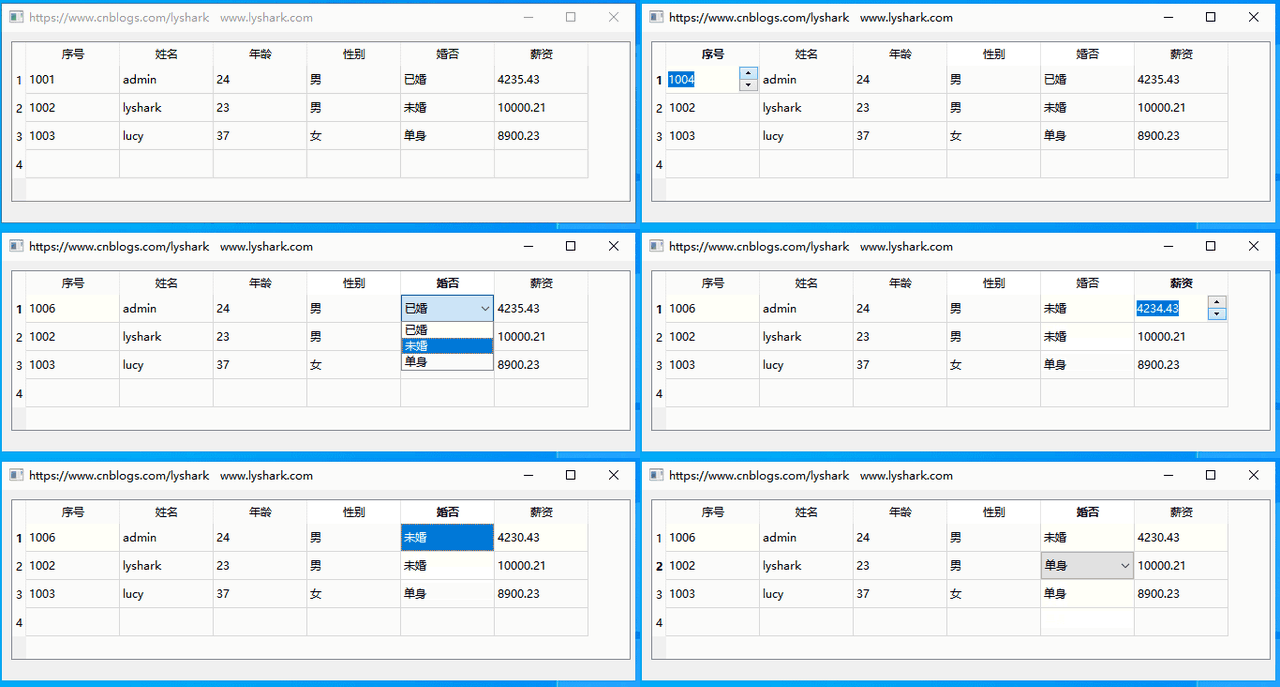
代理部件关联后,再次运行程序,会发现原来的TableWidget组件中的编辑框已经替换为了选择框等组件: | 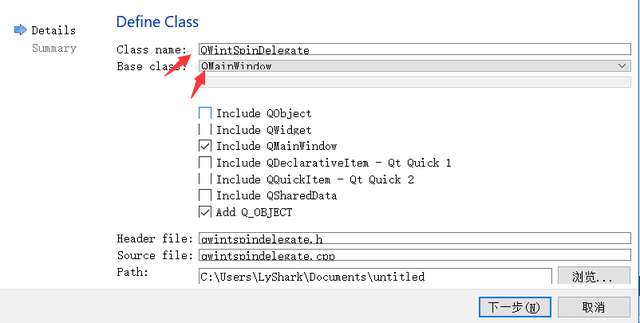

 /1
/1 
 |手机版|免责声明|本站介绍|工控课堂
( 沪ICP备20008691号-1 )
|手机版|免责声明|本站介绍|工控课堂
( 沪ICP备20008691号-1 )